 SpreadsheetGear for Windows
Product Overview

SpreadsheetGear for Windows builds on the power of SpreadsheetGear Engine for .NET—included at no additional cost—to deliver high‑performance, Excel‑compatible spreadsheet UI controls for .NET 6+ WPF and Windows Forms, image rendering APIs and more. Developers can create, open, modify, calculate and save Excel workbooks while delivering high‑DPI, interactive spreadsheet controls to your end-users—all written entirely in safe C# with no dependencies on Microsoft Excel.
SpreadsheetGear for Windows requires .NET 6 for Windows (net6.0-windows) or higher. The UI controls (WorkbookView and FormulaBar, Explorer dialogs, etc.) require Windows Forms or WPF, but image rendering can be used in any application type, including ASP.NET Core, Azure Functions, WinUI Apps, Console Apps and others.
Getting Started

SpreadsheetGear for Windows is distributed on NuGet as the SpreadsheetGear.Windows package. Use Visual Studio's Package Manager to add a reference to this package. If using the .NET CLI, use the below command; or for other installation options see the SpreadsheetGear.Windows NuGet Package page.
> dotnet add package SpreadsheetGear.Windows
When installed from NuGet, the product defaults to a limited Free mode. To use the Licensed or Evaluation modes, activation is required.
Live .NET Spreadsheet Snippet Samples
Other Samples
See the following samples that demonstrate SpreadsheetGear for Windows's capabilities:
Excel-Compatible WorkbookView and FormulaBar
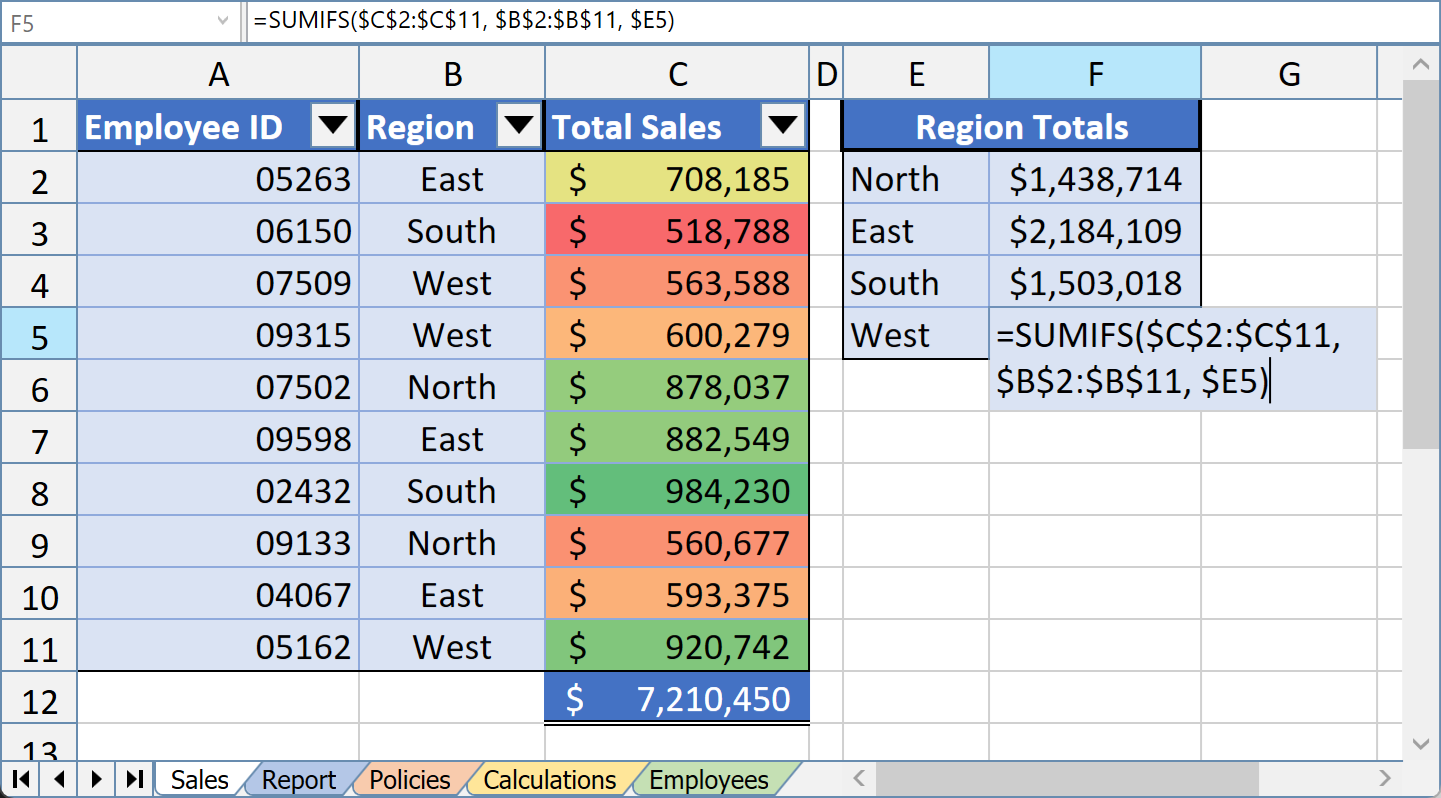
Build a rich and interactive Excel-like spreadsheet experience directly in your .NET applications with a simple drag and drop of the WorkbookView and FormulaBar controls on your Windows Form or WPF Window. Key capabilities include:
- In-cell editing and formula building
- Interruptible multi-threaded background calculations
- Cut, Copy, Paste
- Insert, Delete, Clear
- Undo & Redo
- Zoom
- Charts, Pictures, Cell Comments, TextBoxes, AutoShapes, Form Controls
- Auto-Filters
- Data Validation
- Hyperlinks
- Conditional Formats
- Grouping & Outlining
- Find & Replace, Go To, Sort, Goal Seek
- Printing
- Multiple workbooks
- Display Reference
- Workbook Designer
- Explorer Dialogs
- Much more
Clone the SpreadsheetGear Explorer Samples on GitHub to see the WorkbookView and FormulaBar in action.
Productivity-Boosting Workbook Designer and Explorer Dialogs
Workbook Designer

Workbook Designer
Inspect, design and format all aspects of your Excel workbooks
Launchable from your own apps, the Workbook Designer provides your end-users with an interactive Excel-like UI to open, edit, calculate, format, and save multiple Excel-compatible workbook files, including the Excel file formats .xls, .xlsx and .xlsm.
Design-Time Excel Workbook Authoring in Visual Studio
You, the developer, can utilize the Workbook Designer at design time from Visual Studio's Windows Forms or WPF design surface and the WorkbookView's context menu, allowing you to populate, format and embed one or more workbooks within your application, which will automatically load and display when your end-users launch the application.
Workbook Explorer

Workbook Explorer
Navigate and manage workbook structure and settings from one dialog
The Workbook Explorer provides a broad overview of your workbook set and all opened workbooks within it, enabling quick access to manage various workbook and worksheet settings such as:
- Calculation Modes and Options
- Workbook and Worksheet Scoped Defined Names
- Window Options for Workbooks and Worksheets
- Worksheet Visibility and Protection
- Page Setup (Print Headers/Footers, Zoom & FitToPages, Page Breaks and more)
- Document Properties
- Worksheet Outlines Options
Range Explorer

Range Explorer
Easily format any aspect of Excel ranges
Quickly apply formatting to the WorkbookView's selected range with the Range Explorer including:
Chart Explorer

Chart Explorer
Create and customize Excel‑compatible charts
Enable your users to customize their charts with the Chart Explorer, which presents various chart elements (such as Chart Area, Plot Area, individual Series, Axes, Legend, Chart Title and more) in a hierarchal and easy-to-navigate way, allowing them to quickly drill down into the desired part of the chart and modify as needed.
Shape Explorer

Shape Explorer
Create and customize Excel‑compatible charts
Excel objects such as Charts, TextBoxes, AutoShapes, Cell Comments and Form Controls (like Buttons) inherit from a top-level "Shape" object (implemented by the SpreadsheetGear.Shapes.IShape interface). The Shape Explorer dialog provides a place to modify properties that are shared among the various shape types as well as shape-specific options which will contextually appear depending on the type of shape that is currently selected.
Product Activation
SpreadsheetGear for Windows runs in one of three modes:
Licensed Mode
If you purchased a license that includes access to SpreadsheetGear for Windows, activate the fully-licensed and unlimited mode of the product by generating a signed license from the Licensed User Downloads page and calling the SpreadsheetGear.Factory.SetSignedLicense(...) method with your signed license string. See the Signed License page for more details on this activation mechanism.
Evaluation Mode
Other than a 30-day limit, placing watermarks over rendered images and an "Evaluation" tooltip that pops up over the Windows Forms and WPF WorkbookView controls, the evaluation mode is identical to the fully-licensed mode, giving you a perfect representation of what you would get if you purchased SpreadsheetGear for Windows. Start your 30-day trial by generating a Signed Trial License from the Evaluation Downloads page and follow the instructions on the Signed License page.
Free Mode
Adding a reference to the SpreadsheetGear.Windows NuGet package without activating a signed license (i.e., not calling the SpreadsheetGear.Factory.SetSignedLicense(...) method) will run the product in a limited free mode. SpreadsheetGear LLC grants you a perpetual royalty free license to use this free mode of SpreadsheetGear for Windows at no cost subject to the following:
- this no cost license is limited to 1,000 rows x 100 columns x 10 worksheets x 3 workbooks.
- this no cost license does not include technical support but you are welcome to ask questions at https://stackoverflow.com/questions/tagged/spreadsheetgear.
- by downloading this SpreadsheetGear software or using this no cost license, you consent to be bound by and are becoming a party to the SpreadsheetGear EULA at https://www.spreadsheetgear.com/company/files/eula.html.
Licensed User Downloads Evaluation Downloads Purchase SpreadsheetGear
Documentation
The feature sets and public APIs of the various SpreadsheetGear products overlap considerably. Consequently, we maintain a single set of documentation based on the SpreadsheetGear 2023 for .NET Framework product. Most of this documentation also applies SpreadsheetGear for Windows. With that in mind, note the following:
- The SpreadsheetGear for Windows product consists of a set of assemblies (
SpreadsheetGear.Drawing.dll,SpreadsheetGear.Windows.Forms.dll,SpreadsheetGear.Windows.WPF.dll, etc.) which closely mirror the capabilities of their corresponding SpreadsheetGear 2023 for .NET Framework assemblies (see documentation forSpreadsheetGear2023.Drawing.dll,SpreadsheetGear2023.Windows.Forms.dll,SpreadsheetGear2023.Windows.WPF.dll, etc.). Some differences do exist (visit our Comparison Page for more information) but SpreadsheetGear for Windows also has certain advantages over SpreadsheetGear 2023 for .NET Framework, such as:- High-DPI Support for the WorkbookView, FormulaBar, Workbook Designer and various "Explorer" dialogs.
- Dynamic per-monitor DPI awareness.
- Rich-text formatting is supported for the Windows Forms WorkbookView.
- SpreadsheetGear for Windows takes a dependency on and includes a license to use the SpreadsheetGear Engine for .NET product (the
SpreadsheetGearNuGet package), which provides core spreadsheet functionality such as reading, writing, modifying and calculating workbooks. The SpreadsheetGear Engine for .NET's assembly (SpreadsheetGear.dll) has an API which is virtually identical to that of SpreadsheetGear 2023 for .NET Framework's "Core" assembly (see documentation forSpreadsheetGear2023.Core.dll). Please visit our Comparison Page for more information on where differences do exist. - SpreadsheetGear for Windows uses internal font metric and layout implementations in SpreadsheetGear Engine for .NET to enable autofitting of rows and columns or working with charts and shapes.
- Most of Key Concepts applies and is important for understanding the APIs in
SpreadsheetGear.dlland the other assemblies.

 Quick-Fill