Frequently Asked Questions
Sales and Licensing
Can SpreadsheetGear be deployed royalty free?
SpreadsheetGear can be deployed royalty free with most client and server applications. Please see the license agreement for limitations.
How many developer licenses do I need to purchase?
What is a Signed License?
A Signed License is used with NuGet-distributed products to activate either a trial or fully-licensed mode. Current products that use a Signed License include:
- SpreadsheetGear Engine for .NET
- SpreadsheetGear for Windows
SpreadsheetGear for .NET Framework does not use Signed License strings.
The Signed License itself is a string generated from either the Evaluation Downloads page or the Licensed User Downloads page. It should be supplied in your application with the following line of code, which should be called somewhere before any other SpreadsheetGear API is called:
SpreadsheetGear.Factory.SetSignedLicense("YOUR SIGNED LICENSE HERE");
See the Signed License page for more details.
What is the Export Control Classification Number (ECCN) for SpreadsheetGear Software?
Any use of or reliance on this information is at your own risk and is without recourse to SpreadsheetGear LLC. This information is subject to change without notice.
SpreadsheetGear 2010 for .NET Framework, SpreadsheetGear 2012 for .NET Framework and SpreadsheetGear 2017 for .NET Framework, SpreadsheetGear 2023 for .NET Framework, SpreadsheetGear Engine for .NET (formerly called SpreadsheetGear for .NET Standard) and SpreadsheetGear for Windows are self-classified with an ECCN of 5D992.c under EAR 742.15(b)(1), a license designation of NLR (“No License Required”), an Authorization Type of MMKT ("Mass Market") and an Export Registration Number (ERN) of R108616. These products encrypt Microsoft Excel documents using the .NET Framework Cryptography APIs as described in “2.3.4 ECMA-376 Document Encryption” of the document known as “[MS-OFFCRYPTO]: Office Document Cryptography Structure” which can be found here.
SpreadsheetGear 2012 for Silverlight and all other SpreadsheetGear software have an ECCN of EAR99.
Please see "10. Export Rules" in the SpreadsheetGear End User License Agreement for more information.
Can multiple versions of SpreadsheetGear for .NET Framework be used at the same time on one machine?
Yes. SpreadsheetGear for .NET Framework includes strong named assemblies and installs each major version of the product in its own directory, which enables the installation and use of multiple versions on one machine.
Please note that while multiple major versions of SpreadsheetGear for .NET Framework can be installed side-by-side on the same machine, multiple minor versions cannot. Running a minor version installer on a machine that already has another minor version of the same major version installed will overwrite the original minor version.
If you need to run multiple versions of the same major version on a machine, we recommend keeping your own copies of the SpreadsheetGear assemblies for each version and reference your copies directly. The default installation folder for SpreadsheetGear for .NET Framework versions is: "C:\Program Files (x86)\SpreadsheetGear\".
General Product Questions
Is Excel required to use SpreadsheetGear?
Is COM required to use SpreadsheetGear for .NET Framework?
What versions of Excel does SpreadsheetGear support?
Where did the "SpreadsheetGear for .NET Standard" product go?
Beginning in Version 9, we renamed "SpreadsheetGear for .NET Standard" to "SpreadsheetGear Engine for .NET". This was done for a couple of reasons:
- Before the name change, this product only targeted .NET Standard. But in Version 9 we started targeting both .NET Standard 2.0 and .NET 6, necessitating a name change.
- To clarify the role of this product as primarily being a spreadsheet engine. Other products can supplement SpreadsheetGear Engine for .NET, such as using "SpreadsheetGear for Windows" to bring in Windows Forms / WPF UI controls, image rendering, printing, etc.
Does SpreadsheetGear support charts?
Do you have a list of supported Excel functions?
See the Supported Excel Compatible Functions on the product page.
Do you have samples for Windows Forms or WPF Applications?
Samples for the SpreadsheetGear for Windows product and Windows Forms and WPF are available from the SpreadsheetGearExplorerSamples GitHub repository at: https://github.com/SpreadsheetGear/SpreadsheetGearExplorerSamples.
If you are using SpreadsheetGear for .NET Framework, the installer comes with the SpreadsheetGear Explorer, a helpful Windows Forms Application sample similar to the GitHub WinForms Explorer samples. See SpreadsheetGear Explorer Sample Solutions for instructions on running the SpreadsheetGear Explorer.
Why does AutoFitting columns in SpreadsheetGear and then saving and opening that file in Microsoft Excel result in columns that aren't quite fitted anymore?
The reason for AutoFit columns being slightly off is that the font metrics provided to us by .NET differ from those used by Microsoft Excel. You can work around this problem by adding a fudge factor to the column width after calling AutoFit(). Example:
IRange column = worksheet.Cells["A:A"].Columns;
column.AutoFit();
column.ColumnWidth *= 1.08;
Or when AutoFitting multiple columns:
IRange columns = worksheet.Cells["A:D"].Columns;
columns.AutoFit();
foreach (IRange column in columns)
{
    column.ColumnWidth *= 1.08;
}
When I copy and paste a large range of data from Microsoft Excel to my SpreadsheetGear application using the Windows Clipboard, why isn't the entire range copied over?
This is a known limitation. When copying data from Microsoft Excel, they place several different versions of your data on the Windows Clipboard, the two primary versions being:
- A "Biff8" representation, i.e., an Excel 97-2003 / *.xls file, containing your copied data.
- A Binary Open XML representation, i.e., an Macro-Enabled Open XML / *.xlsb file.
SpreadsheetGear must use the *.xls representation of the Clipboard data because SpreadsheetGear does not yet support reading or writing *.xlsb files. The older *.xls file format has limits of 256 columns and 65,536 rows (compared to the larger limits of Open XML files--16,384 columns and 1,048,576 rows), and so data beyond these limits will not be included when pasting into SpreadsheetGear. Other aspects of data could also get lost, such as more advanced Conditional Formatting options like Icon Sets, more than 3 rules, etc., since these are not supported in *.xls.
Why do I get an error when attempting to open a SpreadsheetGear-saved file using OleDB?
SpreadsheetGear utilizes an optimization in Open XML files that omits writing out certain sheet data attributes that are not always required. Omitting these attributes has the benefit of significantly reducing the file size of some workbooks--particularly files with a lot of cell data. While this optimization is compliant with the Open XML specification, OleDb cannot handle files that do not always write out these attributes.
To work around this, you can set the IWorkbookSet.Experimental property to the value of "OleDbOpenXmlWorkaround", which will cause SpreadsheetGear to always write out these attributes and so allow OleDb to read the files:
// Create an IWorkbookSet with the OleDbOpenXmlWorkaround option enabled
IWorkbookSet wbs = Factory.GetWorkbookSet();
wbs.Experimental = "OleDbOpenXmlWorkaround";

// Open or create a workbook.
IWorkbook workbook = wbs.Workbooks.Open(@"C:\Path\To\Workbook.xlsx");

// Save file and OleDb should be able to now read it
workbook.SaveAs(@"C:\Path\To\Workbook_OleDb.xlsx", FileFormat.OpenXMLWorkbook);
After upgrading to .NET 5 or later, SpreadsheetGear’s string comparison results are different which changes the results for comparing text, sorting text, workbook functions which rely on comparing text (LOOKUP, HLOOKUP, VLOOKUP, MATCH, etc…) and any other feature which relies on comparing text.
The cause for this issue relates to a breaking change in .NET 5 and later. This is documented by Microsoft:
https://learn.microsoft.com/en-us/dotnet/standard/base-types/string-comparison-net-5-plus
Prior to this change (.NET Core 3.1 and earlier and .NET Framework), an app would use the host Windows OS’ National Language Support (NLS) APIs to perform various tasks relating to localization, string comparisons, etc. Starting in .NET 5, they now use an International Components for Unicode (ICU) library, which isn’t tied to the Windows OS and allows for more consistent behavior across various runtimes (Windows, Linux, etc.).
Unfortunately, this change results in behavioral differences when performing tasks such as sorting or text comparison, and can potentially have an impact on the results of a number of SpreadsheetGear functions and features, such as those listed above. However, keep in mind this can also affect your own code that might depend on certain behaviors for string comparison / sorting / etc…
Microsoft does provide a way to revert your app to use NLS with .NET 5 or later when running on Windows, which will cause SpreadsheetGear to revert to its previous behavior and results. Please visit the following for instructions on how to make this change, which involves enabling a “System.Globalization.UseNls” setting in your *.csproj or runtimeconfig.json file: https://learn.microsoft.com/en-us/dotnet/core/extensions/globalization-icu
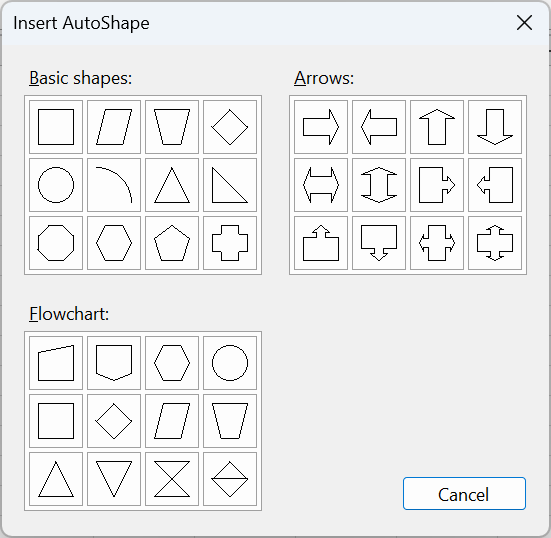
Do you have a list of AutoShapes that have rendering support in your WorkbookView?
Visual Studio
How do I add SpreadsheetGear's Windows Forms and WPF Controls to the Visual 2013 / 2015 / 2017 / 2019 / 2022 Toolbox?
See Add WorkbookView and FormulaBar to Visual Studio Toolbox in the SpreadsheetGear Help.
Why don't I see SpreadsheetGear listed under the .NET tab when using Add Reference?
Why does the IntelliSense and Dynamic Help not work in Visual Studio?
SpreadsheetGear 2023 assemblies come with IntelliSense Help which works with all supported versions of Visual Studio. If you recently installed a new version of SpreadsheetGear, you may need to remove any references to SpreadsheetGear assemblies from your project using the Solution Explorer window in Visual Studio. First, remove any old references, then, add any new ones back by using the .NET tab of the Add Reference dialog.

 Quick-Fill